First Nations housing management software
Housing management your nation owns.
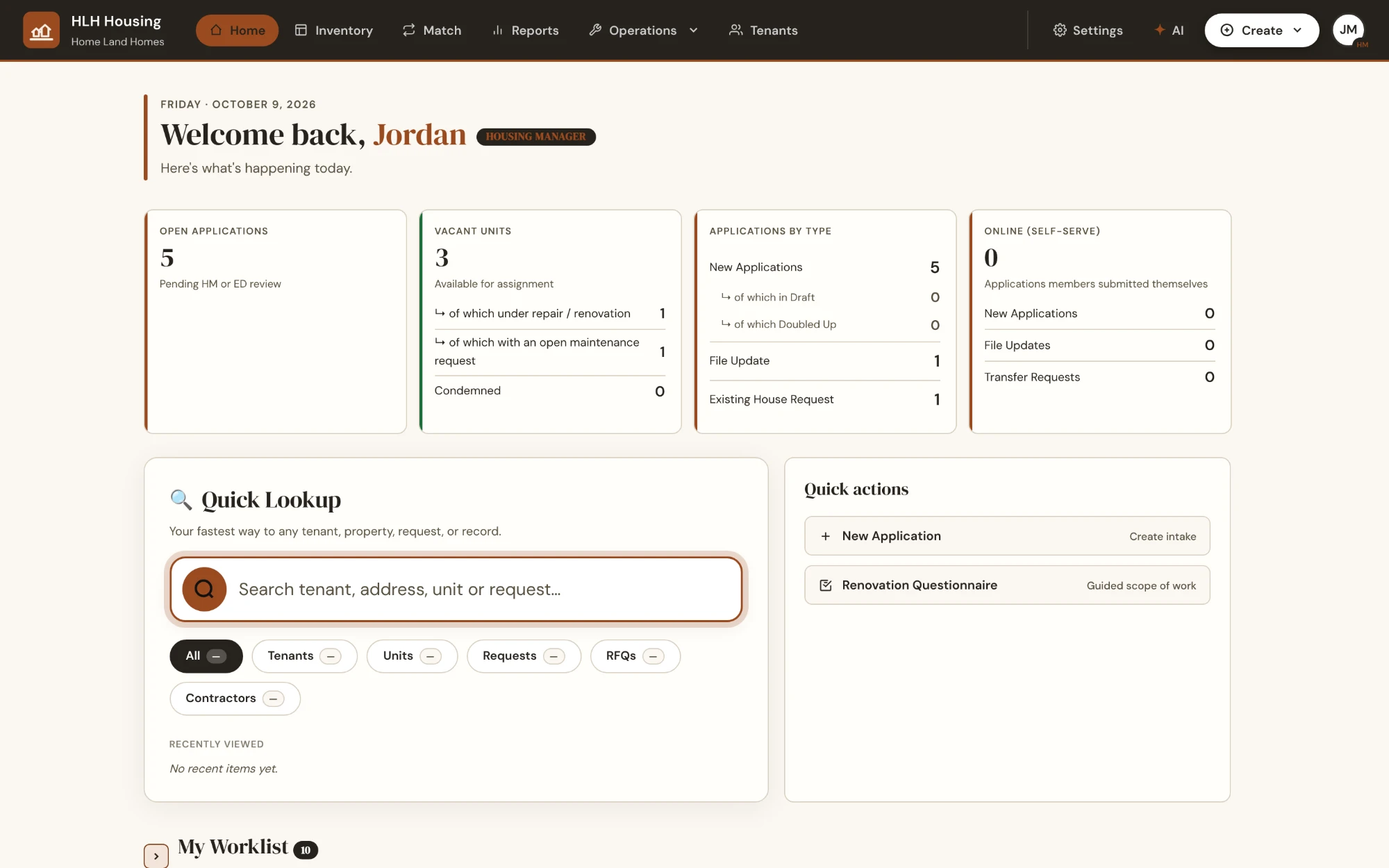
One housing management system for applications, waitlists, maintenance, inspections and rent — designed around how First Nations housing actually works, with your community's data in its own database, under your control.
No spreadsheets. No paper piles. No handing your members' information to someone else's data business.
The sovereignty promise
Your members' information belongs to your nation. Full stop.
Most software pools every customer's records into one big shared database. We don't. Home Land Homes is built so that each nation's data is genuinely, structurally its own.
A database of your own
Every nation gets its own separate database — not a shared one with a filter. Your applications, tenant files and finances are physically isolated from every other community's.
Aligned with OCAP® principles
Ownership, Control, Access and Possession guide how the platform is built: your nation decides who sees what, and your records stay in your possession — including if you ever choose to leave.
Never sold. Never mined.
Your data is not sold, shared, or used to train anything — no Big-Tech data harvesting, and even the maps use OpenStreetMap instead of Google.
Hosted in Canada
Your nation's data is hosted on Canadian infrastructure and stays in Canada — no offshore replication of your members' records, and no routing through wherever a vendor's servers happen to be cheapest.
OCAP® (Ownership, Control, Access and Possession) is a registered trademark of the First Nations Information Governance Centre (FNIGC). Home Land Homes is designed in alignment with these principles; we are not affiliated with or endorsed by FNIGC.
What it does
Everything your housing department runs on, in one software system.
Not generic property software with the labels changed — the workflows are modelled on how First Nations housing departments actually operate.
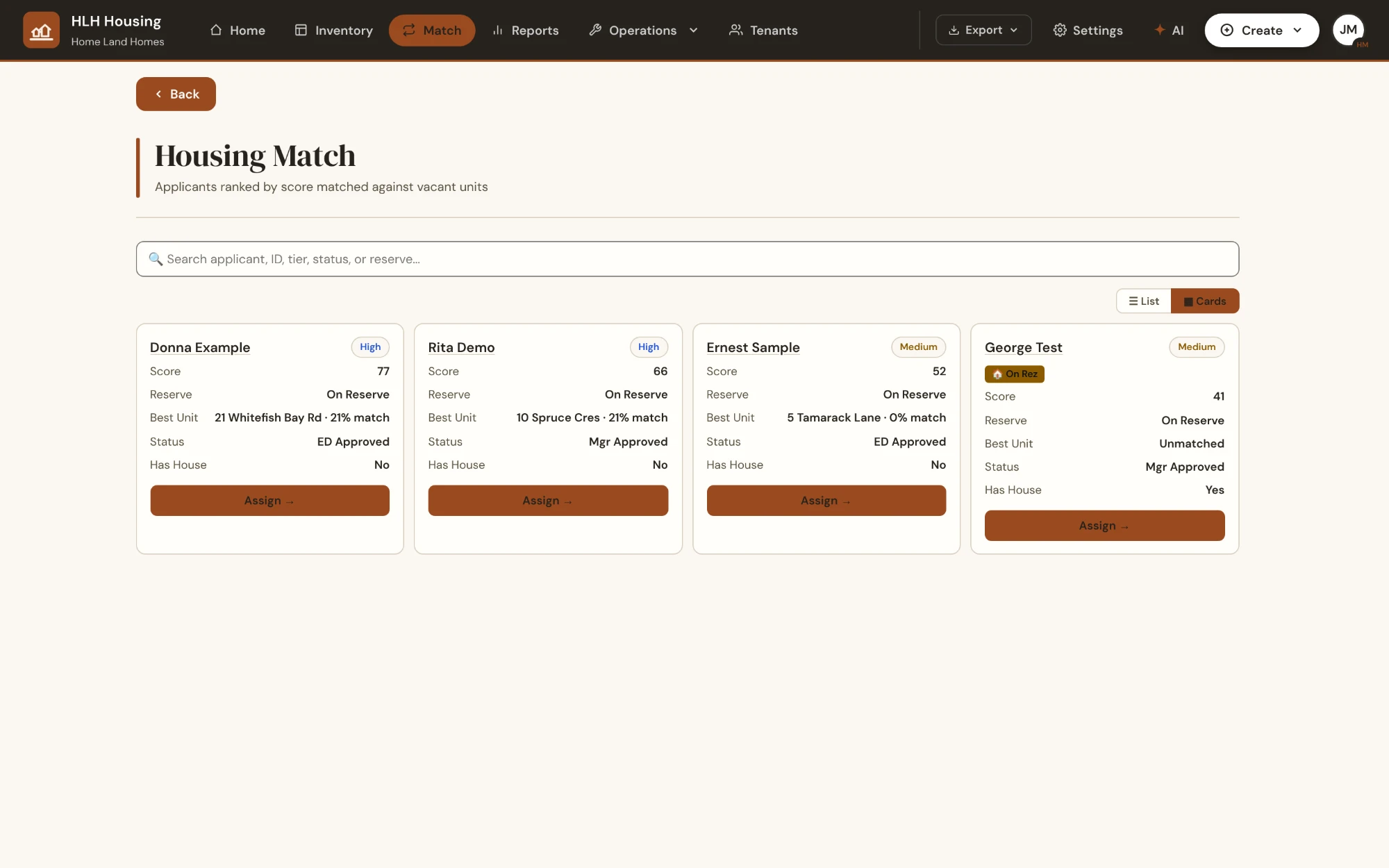
Applications & placement
- Fair, transparent waitlists — needs-based scoring you can tune, with clear approval steps instead of arguments.
- Real FN application types — new housing, transfers, and file updates handled differently, the way they should be.
- Smart matching — match approved applicants to vacant units by configurable priority: on-reserve status, urgency, unit fit, Elders units.
- BCR ineligibility handling — band council resolutions are flagged automatically at approval and assignment time.
Homes & tenants
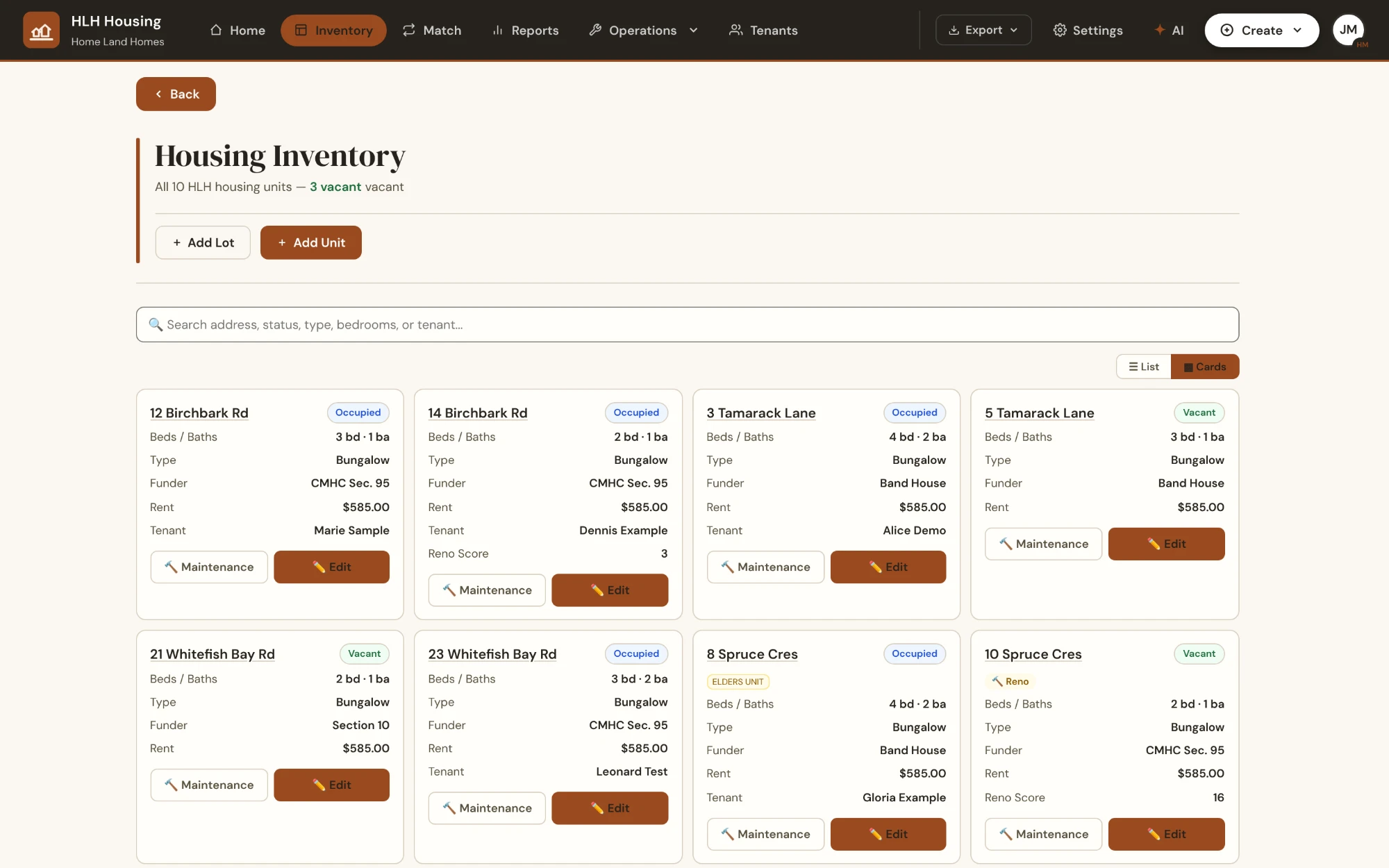
- Full unit inventory — every home — and community building — with its condition, funding source, inspection dates and history.
- Forward an email, it files itself — your nation gets its own intake address; staff forward tenant and funder emails and triage them onto the right unit's file, attachments included.
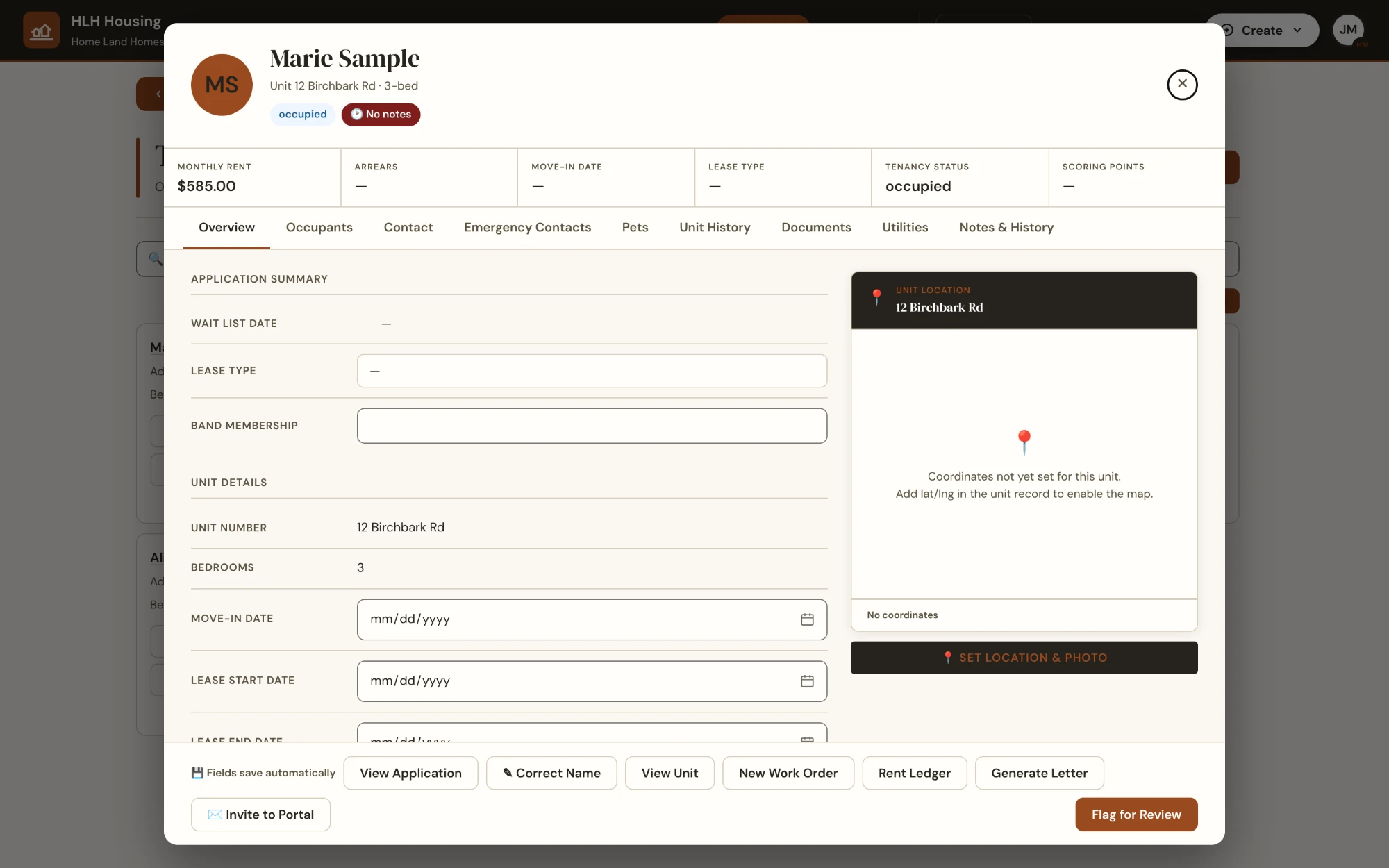
- Tenant Information Card — one card per tenant: agreement, notes, utilities, documents and unit history together.
- Funding-aware records — CMHC Section 95, Section 10, Band Housing, Band Rep and FNCFS tracked per unit and renovation.
- Inspections with photos — room-by-room condition reports that can spawn work orders on the spot.
- Not only houses — band offices, community and program space, retail and storage are managed as buildings too, with their own request and approval path that never touches the residential waitlist.
Maintenance & renovations
- Maintenance requests to done — from report to work order to sign-off, assigned to your own crew or a contractor.
- QR-code requests — tenants scan the label on their unit and submit an issue with photos from their phone. No phone tag. The app generates the print-ready labels, from paper sheets to durable metal-press files.
- Where it came from is on the record — a request is logged as coming from the tenant, the housing department, a medical-centre referral or an emergency, with the referring contact, and the acknowledgement letter goes out in wording your office controls.
- Renovation scopes & tendering — guided scope-of-work builder, RFQs, bids, awards and generated contracts — from a tender or straight from a maintenance request — with progress payments tracked against every work order.
- Contractor registry — approvals, insurance and WSIB expiry tracked so nothing slips.
- A contract without a tender — small jobs that never go to RFQ still get a proper contractor agreement, generated from the request itself with the same schedules and signatures as a tendered one.
Money & accountability
- Rent set by a model, not by hand — a CMHC market-rent baseline, income-assistance shelter rates, and an age-based adjustment schedule your nation versions and dates. New rates apply at turnover only, so sitting tenants are never repriced out of the blue — and every rent keeps a record of the schedule it came from.
- Rent & arrears without the spreadsheet — ledger, payment arrangements, collections, loans, invoices and utilities. Statements, invoices and receipts go out as clean PDFs, emailed straight to the tenant.
- Leadership reports — a read-only Reports dashboard of housing KPIs for Chief & Council; the underlying data never leaves the nation.
- Audit trail on everything — every change is logged, so answers are minutes away, not meetings away.
Staff superpowers
- An AI assistant that knows your data — staff ask plain-language questions and get answers from your nation's own records, and it will draft a scope of work, a decision note or a capital-project milestone plan for someone to review. Read-only, permission-aware, and it never trains on your data. Optional add-on.
- Generated documents — occupancy agreements (fixed-term, month-to-month and commercial), work orders, contractor agreements and reports produced as clean PDFs.
- Cleanup tools built in — import an arrears ledger out of your old system, reconcile applications against who is actually housed, merge duplicate files, and correct a misspelled name everywhere at once.
- Works in the field — phone-friendly screens for crews doing inspections and work orders on site.
For tenants & applicants
NewTwo different people, one front door: someone applying for a home, and someone already living in one. Both sign in at your nation’s own web address, under your name and colours.
- Community members apply online — members apply for housing, update their file, or request a transfer from a phone, upload their documents, and submit — without a trip to the office or a paper form to lose.
- Housed members get their own home page — a member already in a unit signs in to My Home: their address, their documents, and every request they have ever made, in one place.
- Report a repair without phoning anyone — a guided questionnaire walks a tenant from room to fixture to what is actually wrong, takes photos from the phone, and files a real maintenance request your crew can act on.
- They can see where it stands — live status on every request they have filed, so nobody has to ring the office to ask whether someone is coming.
- Membership verified at the door — the band / membership number is checked against your nation’s own number when a member signs in, so what lands on your waitlist comes from your members.
- No passwords to forget — secure magic-link sign-in by email.
- Applications open or closed, your call — online intake is a switch your office controls. Closing it never touches the people already housed: My Home and repair reporting keep working either way.
- Automatic updates — email notifications keep applicants and tenants informed at each step.
Policy & compliance
NewYour housing policy stops being a binder nobody opens. The rules that decide who is eligible and how arrears are handled live in your system as settings — each one carrying the clause number it comes from.
- Your numbers, not ours — minimum applicant age, years between allocations, years between renovation support, good-standing requirements. Your council decides them; your staff change them in Settings without waiting on a software release.
- Every rule cites its clause — when the system flags an applicant, it shows the section of your own policy it is applying. Arguments at the counter get a lot shorter.
- Arrears handled by the policy, not by mood — repayment minimums, the protected window, review cadence, notice periods and the preconditions for eviction are applied the same way for everyone, and the whole chain is on file.
- Exceptions are decisions, not accidents — an override is the Executive Director's to make, and it lands in the audit log with who made it and when.
Capital projects & builds
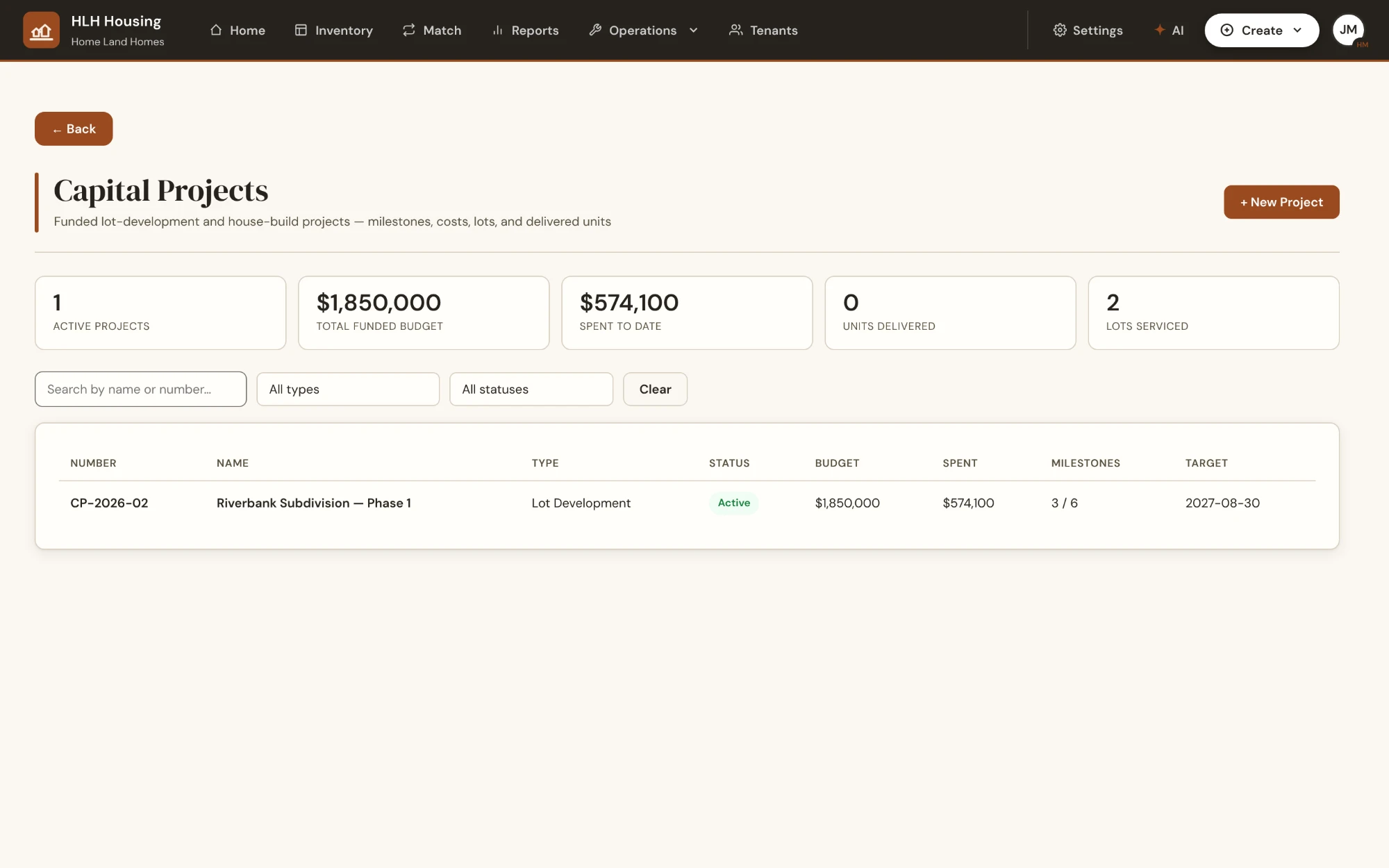
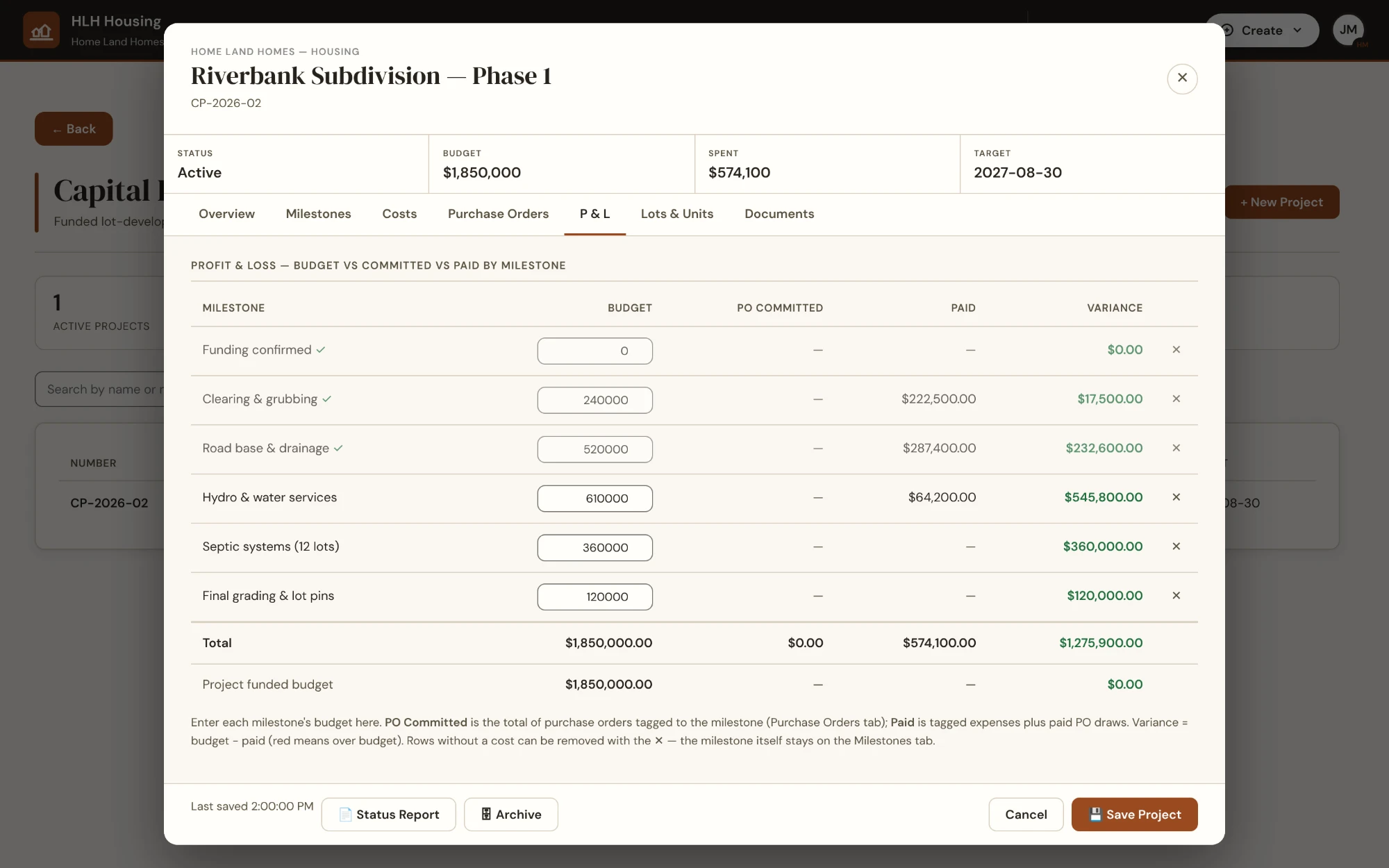
NewFrom "develop 20 lots" to "build five houses" — plan the project, track every dollar against every milestone, and hand your funder a complete claim package.
- Milestones with budgets — budget vs. actual with variance, per milestone, so overruns show up early instead of at year-end.
- Multiple funders per project — track several grants on one build, each with its funding agreement on file, and bill claims against the right one.
- Purchase orders paid down in steps — track a PO across material, phase and holdback draws, each with its invoice attached, feeding straight into the project’s budget-versus-actual.
- Funder-ready claim packages — one click produces the claim summary plus every invoice, EFT confirmation and bank statement. Missing paperwork blocks the claim before it embarrasses you.
- From lots to homes — track lots from raw to serviced to built, then create the housing units straight from the lots when the build completes.
- One-click status reports — a full project snapshot PDF for Chief & Council or a funder meeting, any time.
- Connected to the rest — tenders, contractors and unit costs link to the project, so capital work isn't an island.
How it works
From first call to fully running, without a big-bang IT project.
-
We set up your nation
Your own isolated workspace is created — your database, your subdomain, your role structure, and your branding: colours and logo applied across every page and printed report.
-
Your records come with you
Existing units, tenants and waitlists are brought in from spreadsheets and paper files, together with your team. Outstanding arrears import straight from your current system’s ledger, and built-in cleanup tools surface the duplicates, mismatched addresses and half-finished files every migration turns up — so you start clean instead of starting over.
-
Staff and tenants get their tools
Office staff, field crews, leadership and tenants each get the view that fits them — on desktop and phone, online or off.
-
Your data stays yours
You control access, you can export everything, and if you ever leave, your records go with you. That's the deal.
Who it's for
Built for every seat in the housing department.
Housing managers
Run the whole operation — waitlist, approvals, maintenance, budgets — from one worklist instead of five binders.
Executive Directors
Delegate with confidence: configurable approval authorities, override controls, and a full audit trail behind every decision.
Chief & Council
A clear, read-only picture of housing in the community — occupancy, waitlist, renovations — without pulling staff into reporting.
Field staff & crews
Work orders and inspections on a phone, built for gloves-on use and connections that come and go.
Tenants & applicants
Apply for housing online from a phone, upload documents, report a maintenance issue by scanning the QR code on the unit — and hear back without chasing.
Finance staff
Rent, arrears, loans and utility charges reconciled in the same system the housing team already uses.
Trust & security
Boring, careful engineering — the kind you want holding your members' files.
-
Isolation by architecture
One database per nation. A misconfiguration in someone else's workspace can't touch yours, because there is no shared data store to leak from.
-
Access on a need-to-know basis
Role-based permissions down to individual actions: who can approve, who can assign, who can only view. Your ED configures it; the system enforces it. An outside consultant gets their own locked-down sign-in — they can run your tenders without ever being able to award them, and they see nothing else.
-
An audit trail that can't be edited
Every meaningful action is written to an append-only log — entries can't be quietly changed or deleted, by anyone.
-
Support access you can see
If we ever sign in to your workspace to help, it's through a nation-specific secure channel, it's audited on both sides, and your housing director is notified by email the moment it happens. You can also turn that access off entirely.
-
Built for northern connectivity
Slow or dropped connection in the field? Work is saved locally and synced when the connection returns — staff don't lose an inspection to a dead zone.
-
Private by default
No advertising trackers, no analytics scripts phoning home, no third-party cookies — on the product, and on this website.
Pricing
Straightforward pricing, published right here.
One flat price per nation, based on how many homes you manage. Every module is included in every plan — no per-user fees, no per-module nickel-and-diming, and your price is locked for the term you sign.
Small community
Up to 100 homes
from $380/month
| Homes | Per year | Or monthly |
|---|---|---|
| Up to 50 | $4,560 | $420 |
| 51 – 100 | $5,520 | $505 |
+ $3,500 one-time setup
data migration + 2 live training sessions
fixed price — pay up front or spread across your first year
Most communities
Mid-size community
101 – 300 homes
from $540/month
| Homes | Per year | Or monthly |
|---|---|---|
| 101 – 150 | $6,480 | $595 |
| 151 – 200 | $7,440 | $680 |
| 201 – 250 | $8,400 | $770 |
| 251 – 300 | $9,360 | $860 |
+ $6,000 one-time setup
data migration + 4 live training sessions
fixed price — pay up front or spread across your first year
Large community
301 – 600 homes
from $940/month
| Homes | Per year | Or monthly |
|---|---|---|
| 301 – 400 | $11,280 | $1,035 |
| 401 – 500 | $13,200 | $1,210 |
| 501 – 600 | $15,120 | $1,385 |
+ $9,500 one-time setup
data migration + 6 live training sessions
fixed price — pay up front or spread across your first year
Your band is set by the number of residential homes you manage. Band offices, community buildings and commercial space are managed in the same system at no extra charge.
Every plan includes
- All modules: applications & waitlist, unit inventory, tenants, matching, maintenance & work orders, renovations & RFQs, contractor registry, inspections, capital projects, commercial & band buildings, finance, the rent model and your policy rules, email intake, and leadership reports for Chief & Council
- Tenant & applicant portal — community members apply online, housed members report repairs from their own My Home page, and QR-code requests come in with photos
- Unlimited staff accounts with role-based permissions
- Your nation's own isolated database, hosted in Canada
- Setup covers workspace provisioning, your branding, role configuration, migration of your existing unit, tenant, waitlist and arrears records (from spreadsheets, paper, or your current system’s ledger), your policy rules loaded in, live staff training sessions, and go-live support
- Ongoing support, updates and new features — included, not extra
Optional add-on: AI staff assistant — plain-language answers over your nation's own data, plus drafted scopes of work, decision notes, inspection summaries and project milestone plans — $75/month up to 100 homes, $95/month for 101–300 homes, $150/month for 301–600 homes.
Managing more than 600 homes, or looking at a Tribal Council / multi-nation rollout? Talk to us — group pricing is available. Not sure it's worth it? Take the two-minute needs check.
Where the money usually comes from
Managing the housing portfolio is an operating cost, not a capital project. For most nations it belongs to the housing administration and management budget that already exists, rather than to a new funding request.
That usually means it comes out of housing dollars already committed for the year, with no separate application to make.
And because annual billing aligns to the April–March fiscal year, the subscription sits inside the funding year it is paid from — no stub period, no cost split across two budgets.
Every nation's funding agreements are different. Your finance department or funding officer can confirm which budget line this sits under — we will put whatever they need in writing.
All prices in Canadian dollars. Annual billing aligns with April–March fiscal years; monthly billing runs 10% higher than the annual rate, rounded to the nearest $5. The subscription is always at the full published rate, and it is locked for the term you sign. Setup is a fixed price for the scope shown on each plan; anything outside that scope — such as unusually large or messy historical data — is quoted in writing before any work starts, so the price you sign is the price you pay. Setup can be paid up front or spread across your first year’s invoices at no extra cost.
Two-minute needs check
Is it worth it for your nation? See for yourself.
Six quick questions — most let you pick everything that applies. Your answers never leave this page; they turn into a plain-dollar look at what manual housing admin is costing you, and which plan fits.
Staff-time figures use your own answers and an assumed $35/hour fully-loaded staff cost — a starting point for the conversation, not a promise of savings. Nothing you select here is transmitted or stored.
See it for yourself
Request a walkthrough for your housing department.
A demo is a conversation, not a sales pitch: bring your current waitlist headaches and we'll show you, live, how they'd work in the platform.
We'll cover:
- Your application and waitlist process, end to end
- Maintenance, inspections and work orders in the field
- How data isolation and access control actually work
- What onboarding your nation's existing records looks like
Pricing is flat per nation and published above — the demo is where we confirm your fit and final quote in writing.
Ready when you are
The form takes about a minute — your name, your nation, and what you'd like to see. We'll reply within two business days to set up a time.
About
Why we built this
Before this was software, it was my job. I spent a few years as a project manager for a construction company whose primary customer was a First Nation. Bidding jobs was a challenge: there was no shared scope of work, so every contractor wrote their own — which meant every bid priced something different. Bids couldn't honestly be compared, and the nation paid for that lost competitiveness.
Later, as an Executive Director, I saw the office side of the same problem. Tenants' requests went unanswered — not because nobody cared, but because there was no system to document a tenant or unit issue, so a phone call was the only record. Answering funder requests meant days of digging, because the information was never saved anywhere you could find it. We had no process to track house inspections. Applications were paper, and there was no consistent process for how homes were allocated.
None of those were people problems — they were record problems. So I built the system I kept wishing we had: scopes of work standardized so contractors bid on the same thing, tenant issues that become documented work orders instead of phone calls, inspections with a schedule and a record, applications scored consistently instead of allocated by memory, and funder questions answered with a report instead of a week of searching.
That's Home Land Homes — built from inside the work, for the people doing it.
— Kevin Proctor, Founder